
Device Posture Checks with Intune and Entra ID
Device posture is the security state of a device at the moment it requests access: operating system version and patch level, disk encryption, firewall, screen lock, and whether the organisation manages it. Access systems compare that state with a policy and allow, restrict or block the connection. In Microsoft 365, Intune compliance policies evaluate that state and report it to Microsoft Entra ID, where Conditional Access grants or blocks access with the control "Require device to be marked as compliant".
Most Microsoft 365 organisations already own both halves. This guide shows how to configure them, and covers what vendor glossaries and Microsoft how-tos leave out: what Conditional Access device compliance does not cover, and how ZTNA and SSE platforms apply the same signals at the access layer.
Which device signals are worth checking?
A device posture check verifies that a device meets the organisation's security requirements before it can reach an application or network. Typical checks are a minimum OS build, disk encryption, an active host firewall, a screen lock and management by the organisation. Microsoft Intune performs these checks as compliance policies; ZTNA and SSE agents perform them at the access layer.
| Attribute | What it protects against | How it is checked on Windows | How it is checked on macOS |
|---|---|---|---|
| Minimum OS version and build | Old OS releases with known, unpatched vulnerabilities | Intune "Minimum OS version", "Maximum OS version" and "Valid operating system builds"; agents read the version plus the update revision (UBR) from the registry | Intune "Minimum OS version" and "Minimum OS build version"; agents read SystemVersionStampAsString |
| Patch level | Missing recent security fixes on a supported version | A minimum UBR or a valid build range per release; cumulative updates ship on the second Tuesday of the month | Minimum OS build version, because Apple typically updates the build number, not the OS version, with a security update |
| Disk encryption | Data exposure when a laptop is lost or stolen | Intune "Require BitLocker" (Device Health Attestation, measured at boot) or "Encryption of data storage on a device"; agents use Get-BitLockerVolume | Intune "Require encryption of data storage on device" (FileVault); agents use diskutil |
| Host firewall on | Inbound attacks and lateral movement, for example on public Wi-Fi | Intune "Firewall" (Firewall CSP; a conflicting group policy makes the device not compliant) | Intune "Firewall", "Incoming connections" and "Stealth Mode" |
| Screen lock and password | Use of an unattended or stolen unlocked device | Intune "Require a password to unlock mobile devices" and "Maximum minutes of inactivity before password is required" | Intune "Require a password to unlock devices" |
| Certificate present | Proves the device was provisioned by the organisation | A certificate in the machine or user store; Intune SCEP or PKCS certificates | A certificate in the System keychain |
| Domain or Entra join | Ties the device to a directory the organisation controls | dsregcmd /status shows Entra joined, hybrid joined or domain joined | Entra device registration, a prerequisite for "Require device to be marked as compliant" |
| MDM enrolment and compliance | Confirms central management and combines all of the above | Conditional Access "Require device to be marked as compliant"; third parties read the Microsoft Graph complianceState | The same control; third-party Mac management tools such as Jamf Pro can feed compliance into Entra ID as compliance partners |
Sources: Microsoft Learn (Intune compliance settings for Windows and macOS, dsregcmd), Apple Platform Deployment and Cloudflare One documentation.
The OS rows deserve the most attention. Apple usually changes the build number rather than the OS version with a security update, so on macOS a minimum OS build version catches missing patches that a minimum version misses. When a Windows release leaves servicing, raise the minimum version: the Windows 11 23H2 end of servicing is a recent example. Phones add "Jailbroken devices" on iOS and "Rooted devices" on Android Enterprise.
The same attribute is not checked the same way everywhere. Intune "Require BitLocker" and "Encryption of data storage on a device" can give different results on the same laptop. Access products differ too: "domain joined" usually means on-premises Active Directory, not Entra join. Decide which verdict is authoritative before two tools start to disagree.
Regulation points the same way without naming device posture: NIS2 Article 21(2)(i) and (j) cover access control, asset management and multi-factor or continuous authentication, and Implementing Regulation (EU) 2024/2690, which binds digital service providers such as cloud providers, asks in Annex point 6.7.2(g) to allow access, where appropriate, only from authorised devices. The NIS2 guide to device posture checks covers the details.
How Intune and Conditional Access enforce device posture, step by step
The configuration has three parts. First, set two tenant-wide compliance settings in Intune. Second, create one compliance policy per platform with the attributes you want to check. Third, create a Conditional Access policy in Microsoft Entra ID that grants access only with "Require device to be marked as compliant", in report-only mode first. Microsoft documents each step on Microsoft Learn.
Step 1: change two tenant-wide settings
In the Intune admin center, go to Endpoint security > Device compliance > Compliance policy settings:
- "Mark devices with no compliance policy assigned as" defaults to Compliant, which Microsoft labels "This security feature is off". When compliance feeds Conditional Access, switch it to Not compliant, so that only confirmed-compliant devices get access.
- "Compliance status validity period (days)" decides when a device that stops reporting is treated as noncompliant. The default is 30 days; you can set 1 to 120 days.
Step 2: create a compliance policy per platform
Go to Devices > Manage devices > Compliance > Create policy, pick the platform, then configure the compliance settings, the actions for noncompliance and the assignments. Each policy covers one platform and uses the settings named in the table. On Windows, Device health adds "Require Secure Boot to be enabled on the device" and "Require code integrity", and System security adds "Trusted Platform Module (TPM)"; on macOS, add "Require a system integrity protection".
The default action is "Mark device noncompliant", triggered immediately; changing that schedule creates a grace period of 0 to 365 days. Intune reports the compliance status to Microsoft Entra ID, and when several policies apply to one device, Intune keeps the most severe result.
Step 3: require a compliant device in Conditional Access
As at least a Conditional Access Administrator, go to Entra ID > Conditional Access > Policies > New policy. Include all users and exclude the break-glass and directory synchronisation accounts. Target all resources. Under Grant, select "Require device to be marked as compliant". Set Enable policy to Report-only, review the impact, then switch the policy on. The wider logic is explained in how identity-aware Conditional Access controls protect hybrid teams.
Microsoft adds three caveats. Without an Intune compliance policy, this Conditional Access policy will not function as intended. Report-only policies that require a compliant device can still prompt users on macOS, iOS and Android to select a device certificate, so Microsoft advises excluding those platforms from them. And the old "Device state" condition is deprecated: use "Filter for devices", with properties such as isCompliant and deviceOwnership.
Which licences do you need?
Conditional Access requires Microsoft Entra ID P1, which Microsoft includes in Microsoft 365 E3, E5, E7, F1, F3 and Business Premium. Device compliance itself comes from Microsoft Intune, included in Microsoft 365 E3, E5 and E7 and, according to Microsoft's Business Premium documentation, in Business Premium. Device-only Intune licences do not support Conditional Access. Risk-based Conditional Access needs Entra ID Protection, a P2 feature; Entra application proxy needs P1 or P2; Entra Private Access is licensed separately.
Where Conditional Access device compliance stops
Conditional Access device compliance gates sign-ins that go through Microsoft Entra ID, from devices enrolled in Intune. On-premises apps are covered when they are published through Entra application proxy or Entra Private Access. Classic VPN and Wi-Fi need a network access control or VPN product that reads Intune compliance, or the Windows VPN client's Entra certificate.
This is the question existing guides leave open: what does a compliant-device policy actually miss? Microsoft documents the answer itself, spread over a dozen Learn pages:
| Limit | What Microsoft documents | Microsoft's documented route |
|---|---|---|
| Unenrolled and BYOD devices | "Devices must be registered in Microsoft Entra ID before they can be marked as compliant." | The grant "Require app protection policy", generally available for iOS and Android with a broker app |
| Guests | A guest's device is managed by the guest's home tenant | Trust compliant-device claims through inbound cross-tenant access settings; otherwise the guest is blocked |
| On-premises and private apps | Conditional Access applies to sign-ins through Entra ID | Publishing through Entra application proxy (P1 or P2) or Entra Private Access (separate licence) |
| Network access (VPN, Wi-Fi) | Access to corporate Wi-Fi or VPN can depend on compliance only through partner products | A network access control or VPN partner that reads Intune compliance; the Windows VPN client can request a short-lived Entra certificate that is issued only to compliant devices |
| Legacy authentication | Legacy authentication clients do not pass device state information, so grant controls block them | Block legacy authentication |
| Browsers | Device state passes only from supported browsers; the check fails in private mode or with cookies disabled | A signed-in Edge, Chrome with the Microsoft Single Sign On extension, Safari with the Enterprise SSO plug-in |
| Platform detection | "Because user agent strings can be modified, this information isn't verified." | A separate policy that blocks unsupported platforms such as ChromeOS |
| Special device types | Compliance evaluation is not supported for userless macOS devices; Android dedicated devices cannot sign in to protected resources without Entra shared device mode | Entra shared device mode for Android dedicated devices; none published for userless macOS devices |
Source: Microsoft Learn, Conditional Access (Grant, Conditions, External ID) and Intune (compliance settings, network access control integration).
Some limits are by design: an identity provider only sees the applications that use it, as identity providers, SSO and SAML explains. For on-premises and private apps, Entra Private Access versus SASE compares the Microsoft route with the alternatives.
The timing gap
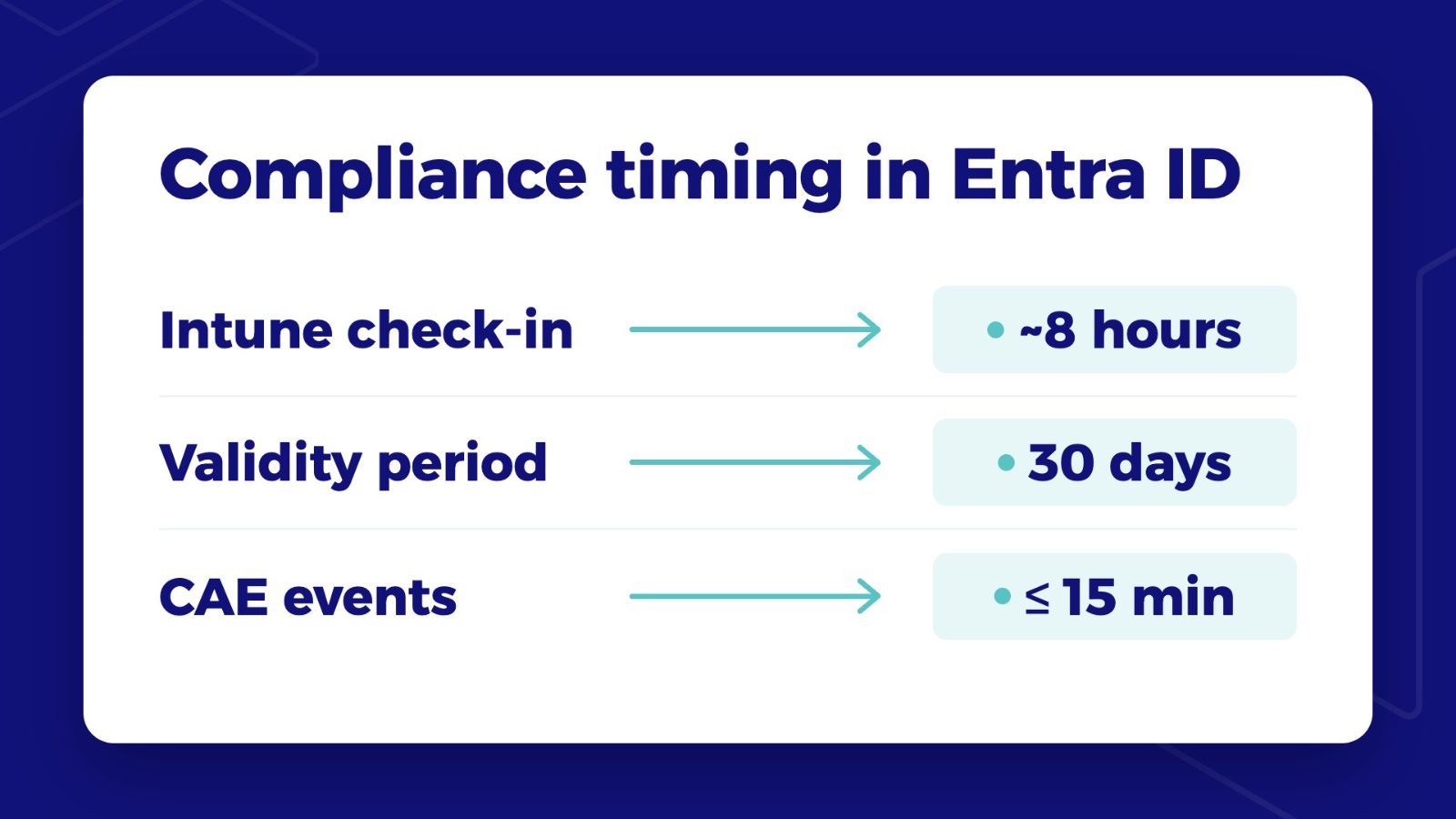
NIST SP 800-207 says posture evaluation "should be continual for as long as the session lasts". Conditional Access works differently. Intune devices check in about every 8 hours, and compliance is re-evaluated when Entra ID issues a new token. Continuous Access Evaluation (CAE) reacts to a short list of critical events, such as a disabled account, a password reset, revoked refresh tokens and high user risk, with a latency of up to 15 minutes. A change in device compliance is not on that list. A device that stops reporting turns noncompliant only when the validity period runs out, after 30 days by default. That makes the compliant-device control a sign-in gate with a delay measured in hours.
Device posture at the access layer: how ZTNA and SSE use the same signals
ZTNA and SSE platforms evaluate device posture where the connection is made, not only at sign-in. They obtain posture in three ways: an agent on the device checks the attributes itself, the platform reads the compliance verdict from Intune, or a certificate that only managed devices hold proves that the device is managed. How often the check is repeated differs per product.
- Local agent checks. Documented examples are the Cloudflare One Client, the Netskope Client, Palo Alto Networks GlobalProtect host information profile (HIP) checks and Cisco Duo Desktop.
- Reading the Intune verdict. The access product asks Intune instead of checking again. Cloudflare polls Microsoft Graph and matches devices by serial number, so Linux is not supported there. Network access control, VPN and ZTNA products use the Intune compliance retrieval service with certificate authentication; Microsoft lists partners such as Cisco ISE, Citrix Gateway, F5 BIG-IP APM and FortiNAC, and asks that broad queries for all noncompliant devices run at most once every four hours.
- Certificates as device identity. Entra ID itself identifies a registered device by a client certificate.
Timing is where products differ most. Conditional Access evaluates when a token is issued, Duo at every Duo prompt. GlobalProtect re-checks HIP on connection and hourly while connected; the Cloudflare One Client polls every five minutes by default. Re-checking is not the same as cutting off: Cloudflare documents that Gateway does not terminate an active session when a later posture check fails. Ask any vendor what happens to a session that is already open.
This is where an SSE platform fits next to Microsoft 365. Jimber SSE combines a secure web gateway, firewall-as-a-service, CASB, browser isolation and device posture and cloud authentication with Microsoft Entra ID and Google Workspace, managed from one console with one agent. With posture at the access layer, the same signals can also gate web and private-application access beyond the Microsoft apps that Conditional Access sees. See what Security Service Edge is; for private applications reached without a network-wide tunnel, see ViPN as an alternative to VPN.
To see how posture at the access layer behaves with your own devices, start with a pilot group: Try Free.
Common pitfalls, from the questions admins ask
Questions on Microsoft Q&A, Microsoft Tech Community and Fortinet Community return to the same handful of problems:
- Compliant in Intune, blocked in the browser. The most frequent complaint. Device identity passes only from supported browsers: Firefox needs version 91 or later on Windows and 133 or later on macOS, and on Linux desktops only Edge qualifies. Edge must be signed in, and Edge InPrivate counts as noncompliant.
- "Not evaluated" after enrolment. The initial state of a new device; an online device can take up to 24 hours to appear in a policy's status chart.
- BitLocker on, device noncompliant. "Require BitLocker" is measured at boot, so reboot after encryption.
- Devices without a policy pass. That is the default described in step 1.
- The wrong platform. The platform comes from an unverified user agent, so block unsupported platforms separately. For Linux, Microsoft's Grant page lists Linux Ubuntu.
- Locked-out Mac accounts. On macOS, "Require a password to unlock devices" expires existing passwords, including local administrator accounts managed with LAPS.
The case for Conditional Access alone
A Microsoft 365 administrator could fairly argue that Conditional Access already covers everything:
"Everything we use already signs in through Entra ID." On-premises web apps run through application proxy and Private Access covers SMB and RDP; a second agent is a second thing that can break. That holds where every resource is Entra-integrated and licensed for it. Private Access needs its own licence, and the remaining limits, such as BYOD, guests, legacy protocols and browser dependencies, come from Microsoft's own documentation.
"Intune is the only posture source we need, and the one auditors recognise." A second product's checks create conflicting verdicts. The conflict is real, which is an argument to reuse the Intune verdict at the access layer rather than check twice: that is what the compliance retrieval service and the Graph complianceState property exist for.
"Re-evaluation when a token is issued is good enough." A device that drifts out of compliance loses access within hours, and frequent re-checks add load and friction. For many mid-market teams, that is a fair trade-off. Base the decision on the timing facts above, not on a promise of continuous posture.
Conclusion
Device posture in Microsoft 365 starts with what most organisations already own. Build one Intune compliance policy per platform, switch "Mark devices with no compliance policy assigned as" to Not compliant, and require a compliant device in Conditional Access after a report-only run. That covers sign-ins to Entra-integrated resources from enrolled devices.
The gaps are just as well documented: BYOD, guests, apps and networks that never see an Entra sign-in, legacy authentication, unsupported browsers and a re-evaluation rhythm measured in hours. For those gaps, apply the same signals at the access layer. Jimber SSE brings device posture and cloud authentication with Microsoft Entra ID and Google Workspace together with web protection, in one console with one agent. Jimber, the company behind it, is a Belgian vendor that builds for the European mid-market.
Try Free with a pilot group, or book a demo to walk through it with the Jimber team.
Frequently asked questions
What is device posture?
Device posture is the security state of a device at the moment it requests access: operating system version and patch level, disk encryption, firewall, screen lock, and whether the organisation manages it. Access systems compare that state with a policy and allow, restrict or block the connection. In Microsoft 365, Intune compliance policies evaluate it.
What is a device posture check?
A device posture check verifies that a device meets the organisation's security requirements before it can reach an application or network. Typical checks are a minimum OS build, disk encryption, an active host firewall, a screen lock and management by the organisation. Microsoft Intune performs these checks as compliance policies; ZTNA and SSE agents perform them at the access layer.
What happens if a device is not compliant in Intune?
Intune runs the policy's actions for noncompliance. By default the device is marked noncompliant immediately, unless the admin set a grace period. When a Conditional Access policy requires a compliant device, Entra ID then blocks sign-ins from that device to the protected resources, and the user sees which setting failed in the Company Portal.
Why does Conditional Access block a device that Intune shows as compliant?
Most often, the sign-in does not carry the device identity: an unsupported or private-mode browser, Chrome without the Microsoft Single Sign On extension, Safari without the Enterprise SSO plug-in, or a signed-out Edge. Other causes are a device that has not checked in within the validity period, or legacy authentication, which never passes device state.
Why did an unused laptop become noncompliant?
Intune treats a device that has not reported its compliance status within the tenant-wide "Compliance status validity period" as noncompliant. The default period is 30 days, and you can set it from 1 to 120 days. The laptop stays noncompliant until it checks in again, so a device that sat in a drawer for a month is blocked until it syncs.
Why does a new device show "Not evaluated"?
"Not evaluated" is the initial state of a newly enrolled device. It also appears for devices without an assigned policy and for devices that have not checked in since a policy change. Reports update only at check-in, and Microsoft notes that it can take up to 24 hours before an online device appears in a policy's status chart.
Which licence do you need to require compliant devices?
Conditional Access requires Microsoft Entra ID P1, which Microsoft includes in Microsoft 365 E3, E5, E7, F1, F3 and Business Premium. Device compliance itself comes from Microsoft Intune, included in Microsoft 365 E3, E5 and E7 and, according to Microsoft's Business Premium documentation, in Business Premium. Device-only Intune licences do not support Conditional Access.
Does Conditional Access device compliance cover VPN and on-premises apps?
Only partly. Conditional Access gates sign-ins that go through Microsoft Entra ID. On-premises apps are covered when published through Entra application proxy or Entra Private Access, which is licensed separately. Classic VPN and Wi-Fi need a network access control or VPN product that reads Intune compliance, or the Windows VPN client's Entra certificate.
How do you let BYOD phones in without enrolling them?
Use the Conditional Access grant "Require app protection policy" on iOS and Android. It needs a broker app on the phone: Microsoft Authenticator on iOS, Microsoft Company Portal on Android. Microsoft announced the retirement of the older "Require approved client app" grant for early March 2026 and advises using only the app protection grant in new policies.
Why are guests blocked by a compliant-device policy?
A guest's device is managed by the guest's own organisation, not by your tenant. Your Conditional Access policy can only accept that device as compliant if you trust compliant-device claims from the guest's home tenant through inbound cross-tenant access settings. Without that trust, a policy that requires a compliant device blocks the guest.