
Secure web gateway
Keep browsing safe and simple
Protect users from web threats with central policy and clean controls. Cloud-managed design reduces effort for IT while keeping performance high.
- Block malware, phishing and risky sites
- Enforce acceptable use across locations
- Gain clear visibility and reports
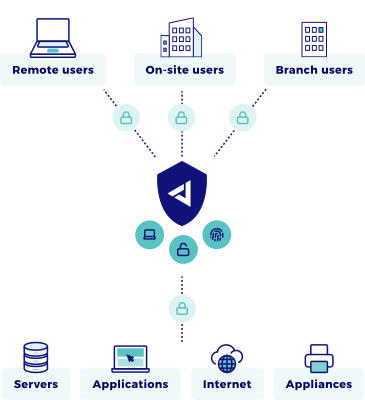
What is Secure Web Gateway (SWG)?
A Secure Web Gateway inspects and controls web traffic so users can browse safely. It applies policies like URL categorization, malware inspection and data controls before traffic reaches the internet. Jimber’s SWG is cloud-managed with identity-aware policy so teams keep acceptable use, compliance and user productivity without heavy infrastructure or complex maintenance.
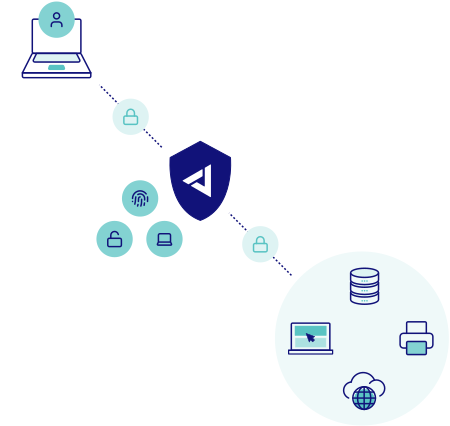
Identify and policy
Map users and groups to web access rules.
Inline inspection
Apply URL filters, TLS inspection and threat checks in real time.
Enforce and report
Allow, block or warn, then log events to dashboards.
How Secure Web Gateway works
Why you should choose Secure Web Gateway
- 95%+ of known malicious domains blocked by category and threat feeds.
- Consistent acceptable use across offices and remote users.
- Fewer tickets through central, reusable policies.
- Clear reports for audits and management.
- Safer SaaS adoption with identity-based controls.
Key Capabilities
- Threat and access controls
- URL and category filtering: allow, block or warn by group and device.
- Malware and phishing protection: real-time checks on risky destinations.
- Policy and identity
- Identity-aware rules: tie policies to users, groups and device posture.
- Time and location controls: adjust rules by site or schedule.
- Operations and visibility
- Central dashboard: monitor activity, alerts and policy hits in one console.
- Reporting and exports: summaries for audits and team reviews.
- Traffic inspection
- TLS inspection: decrypt, inspect and re-encrypt HTTPS traffic inline.
- Application control: detect and govern SaaS and shadow IT usage.
Why Jimber for Secure Web Gateway
- Simple rollout and operations from one cloud-managed console.
- Zero Trust by default with identity-aware policy and least privilege browsing.
- Partner-first multi-tenant model for MSP scale and service packaging.
- Reliable European platform aligned with GDPR and NIS2 expectations.
See Jimber in action
Give your teams safe browsing with identity aware policy and clear controls. Get a guided walkthrough of the cloud managed console and learn how to roll out Secure Web Gateway policies across users, devices, and sites with audit ready reports.
FAQs about Secure Web Gateway
What is the difference between SWG and a firewall?
A firewall controls network-layer traffic by IP and port. SWG inspects web traffic at the application layer, filtering URLs, categories, and content to stop threats before they reach users.
How does SWG enforce Zero Trust?
SWG ties policies to verified user identity and device posture, granting access only to approved destinations. Each request is inspected inline, blocking risky sites even for authenticated users.
What is the impact on latency and performance?
Inline inspection adds minimal delay. Caching, optimized TLS decryption, and policy tuning keep browsing fast while enforcing controls and threat checks in real time.
Can I deploy this in OT networks?
Yes. Place SWG in front of operator terminals and engineering workstations. Pair with NIAC to control web access for agentless devices without disrupting production workflows.
What telemetry is collected?
URL requests, category matches, policy decisions, threat detections, and user activity. Retention aligns with your audit needs and European compliance expectations.
How do I handle false positives?
Start with warn mode to log matches without blocking. Refine category filters and add exceptions per group, then switch to block once rules are validated.
Does it replace my proxy?
It can. SWG provides the filtering, logging, and threat protection of a traditional proxy with identity integration and centralized policy, eliminating separate appliances.