
Remote Work Security
Work From Anywhere. Protected Everywhere.
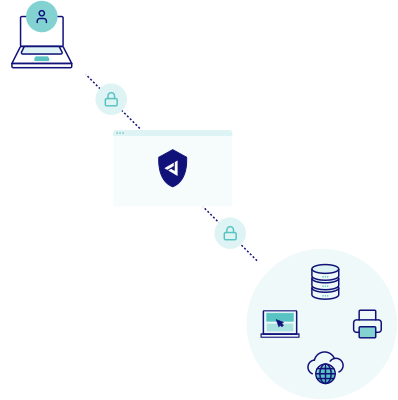
Your team is everywhere. Your apps are in the cloud. But your security? Still stuck at the office perimeter. Jimber delivers application-level protection that follows your users, not your network boundaries.
- 3x faster app access
- 0 hardware to deploy
- 60% lower security costs
Why Remote Access Is Still a Weak Spot
Remote work is permanent, but most companies still rely on security designed for offices. The gaps are real.
- VPN clients that break constantly and slow everything down
- Personal devices mixing work and private without boundaries
- IT has no idea who’s accessing what from where
- One stolen password can compromise your entire network
- Different rules for office, home, and travel confuse everyone
What’s the real cost? Help desk tickets pile up. Users find workarounds. And attackers exploit the chaos.
No More VPN Headaches
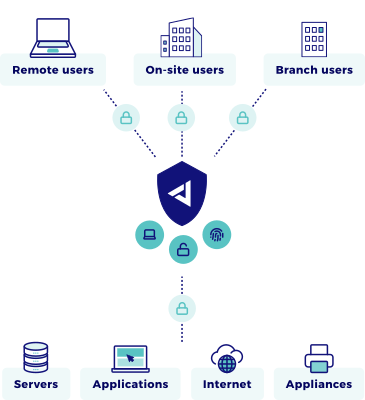
Users connect directly to applications, not networks. No split tunneling. No VPN client that only works on Tuesdays. Just fast, reliable access to what they need.
Every Device Stays in Its Lane
Corporate laptops, contractor tablets, personal phones: each gets precisely the access it should have. Nothing more.
One Team. One View.
IT sees every connection, every device, every application in real time. Policy changes roll out in seconds, not days.
How Jimber Solves
Remote Access
Three steps to secure remote access that actually works.
What’s Inside the Platform
- Zero Trust Network Access (ZTNA)
Replace your VPN completely. Users authenticate once and reach their applications through encrypted, isolated connections. Even if credentials leak, attackers hit a dead end.
- Secure Web Gateway (SWG)
Your team browses the web safely from any location. Malicious sites, phishing attempts, and risky downloads get blocked automatically. No traffic backhauling required.
- SD-WAN
Your office sites stay connected with predictable performance. Traffic routes intelligently based on application priority and network conditions.
- Endpoint Detection & Response (EDR)
Every laptop and phone is protected wherever it connects from. Ransomware and malicious files are stopped before they reach your applications.
- Firewall as a Service (FWaaS)
Cloud firewalling for home offices, hotels and branch sites alike. One set of identity-aware rules, without a box to ship.
The Old Way vs. The Jimber Way
- Legacy Remote Access
- VPN licenses per user
- Install VPN clients everywhere
- Full network access once connected
- Firewall rules per office
- Blind to personal devices
- Manual updates site by site
- Jimber Platform
- Unlimited users, one price
- Browser access where possible
- Application-specific permissions
- Centralized policy engine
- Full visibility and control
- Instant global deployment
What Changes for Your Organization
After implementing Jimber’s remote work platform, organizations experience a fundamental shift in daily operations.
Help desk tickets drop significantly. Users connect faster. Security policies get enforced automatically, not bypassed out of frustration.
Compliance becomes continuous, not a scramble. When laptops get compromised, containment is automatic. And security complexity stops growing with your workforce.
Get Remote Work Right From Day One
Your workforce is already distributed. Your security strategy shouldn’t be stuck in 2015.
Jimber’s platform gives you application-level control without VPN complexity.
Common Questions About Remote Work Security
We’ve always used VPNs. Why change now?
VPNs were built to extend office networks. Today’s work happens in SaaS applications and cloud infrastructure. When you use a VPN, you’re forcing modern workflows through legacy architecture. The result: slow performance, broad access privileges, and frustrated users who find workarounds.
Jimber’s ZTNA gives users direct, encrypted access to specific applications. Faster for them. Safer for you.
How fast can we roll this out to remote workers?
Most organizations complete deployment in under two weeks. Because the platform is cloud-native, there’s no hardware to order or configure. Users download a lightweight client (or use their browser), authenticate, and they’re protected.
IT configures access policies in the central console. Those policies apply immediately to every user, everywhere.
What about contractors and temporary staff?
This is where traditional VPNs create real problems. You either give contractors too much access (risky) or spend hours provisioning narrow access (slow).
With Jimber, you define contractor access once as a template. New contractors get onboarded in minutes with automatic expiration dates. They see only their assigned applications. When the project ends, access revokes automatically.
Can employees still use their personal devices?
Yes, with appropriate controls. You have two options:
Browser-based access: Employees access approved applications through a secure browser session. Nothing downloads to their device. Work data stays in the cloud.
Managed access with posture checks: For devices you trust more, install the Jimber client. Before granting access, the platform verifies the device meets your standards: firewall enabled, disk encrypted, OS up to date.
How does this work for employees who travel internationally?
Seamlessly. Because Jimber’s platform is global and cloud-native, employees connect to the nearest point of presence automatically. They get the same fast, secure access whether they’re in Antwerp, London, or Tokyo.
No special VPN configurations. No expired certificates. No “it works at home but not at the hotel” support tickets.
What happens during an internet outage?
For employees working remotely, if their internet connection drops, they lose access until connectivity returns, just like with any cloud application.
For office locations, we recommend implementing SD-WAN with multiple WAN links for redundancy. This ensures business continuity even if a primary connection fails.
Does this replace our endpoint security?
No, it complements it. Jimber controls who can access which applications and how. Endpoint protection (antivirus, EDR) protects the device itself from malware and threats.
The two work together: endpoint security keeps devices clean, and Jimber ensures those devices only reach authorized resources with appropriate privileges.
How do you prove this works for auditors?
The platform generates comprehensive audit trails automatically. Every access attempt includes:
- User identity and authentication method
- Device details and security posture
- Application accessed and permission level
- Time, duration, and geographic location
- Accept or deny decision with reason
For NIS2 and GDPR compliance, you can demonstrate least-privilege access, continuous monitoring, and incident containment capabilities without manual documentation.